



What Is a Prepaid Crypto Card
What Is a Prepaid Crypto Card and Why It Matters
How a Prepaid Crypto Card Works
- Fund: Top up from your wallet or supported rails (often USDT/USDC or fiat).
- Convert: Funds may convert to your card’s spend currency at top-up or at the moment of purchase.
- Spend: Use a virtual card online or add a physical card for POS/ATM.
- Track & Control: Set limits, freeze/unfreeze, and get real-time alerts in the app.
Why It Matters
- Budget control: Load a fixed amount; avoid revolving debt and overspending.
- Global reach: Spend online and in-store where the card network is accepted.
- Fast access to value: Bridge from crypto to everyday payments without a bank transfer.
- Safer online: Use virtual cards or even disposable numbers for trials and new merchants.
- Travel-friendly: Keep a separate travel balance, choose local currency at POS, and minimize FX surprises.
Prepaid vs Debit vs Credit
| Feature | Prepaid Crypto Card | Bank Debit Card | Credit Card |
|---|---|---|---|
| Funding source | You pre-load from crypto/fiat | Your bank account | Borrowed; repay later |
| Overspending risk | Low (balance-capped) | Medium | Higher (revolving credit) |
| Approval | KYC; no credit check | Bank account needed | Credit check, score impact |
| Rewards | Varies by program | Low–medium | Often highest |
| Use cases | Budgeting, online, travel, crypto bridge | Everyday banking | Large purchases, loyalty maximization |
Key Features to Look For
- Virtual & Physical Cards: Instant online use + POS/ATM flexibility.
- Mobile Wallets: Apple/Google Pay compatibility where supported.
- Fees & FX Transparency: Clear quotes before you confirm.
- Prepaid Crypto Card Controls: Freeze, per-transaction/daily caps, region/MCC rules.
- Security: Passkeys/2FA, real-time alerts, disposable virtual numbers.
- Networks & Rails: Low-fee networks for top-ups and quick settlement.
Typical Fees & Limits
- Application/issuance (virtual vs physical)
- Top-up/Conversion (spread/fee when moving into spend currency)
- FX on non-base currency purchases
- ATM fees (plus operator fees) for physical cards
- Limits: per-transaction, daily, monthly; ATM caps for withdrawals
Pro tip: Make fewer, larger ATM withdrawals; always choose local currency at POS to avoid DCC markups.
Security Best Practices
- Enable passkeys (phishing-resistant) and keep 2FA as fallback.
- Mask Prepaid Crypto Card details by default; reveal only when needed.
- Use disposable virtual cards for trials and new merchants.
- Keep a spend buffer for pre-authorizations & FX variance.
- Turn on alerts for approvals, declines, refunds, and profile changes.
Setup Guide
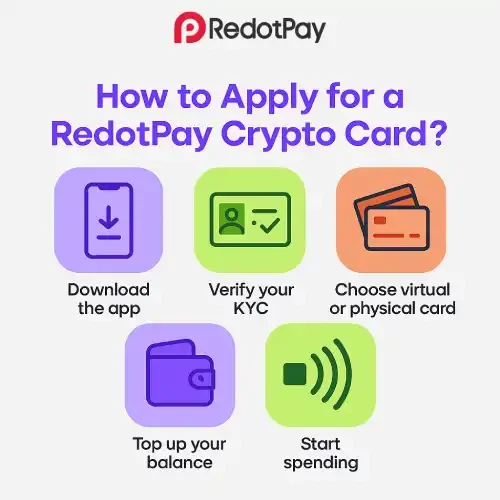
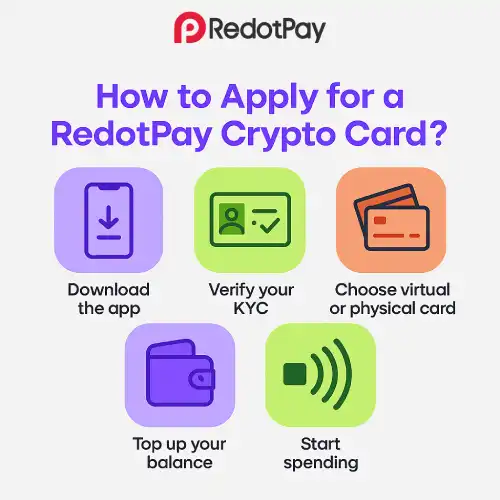
- Sign up & verify (KYC/KYB).
- Create a virtual card for immediate online use; order physical for POS/ATM.
- Fund with stablecoins or supported rails; check the quote screen.
- Add to Apple/Google Pay (where available).
- Set controls: per-transaction/daily caps, MCC/region rules; enable alerts.
- Test with a small purchase before larger transactions.
- Review monthly: fees, limits, and rewards; adjust settings as needed.
Pros & Cons at a Glance
Pros
- Balance-capped spending and easy budgeting
- Fast bridge from crypto to real-world payments
- Safer online with virtual/disposable numbers
- Works globally with major networks
Cons
- Rewards may be lower than premium credit cards
- FX/ATM fees still apply in some cases
- Availability varies by region/tier; KYC required
- On-chain mistakes are final—double-check addresses when funding
FAQs
Do I need to hold volatile crypto?
No. Most people fund with stablecoins or convert immediately to a spend currency.
Will it build my credit score?
Generally no—Prepaid Crypto Cards don’t report like credit lines.
Can I have multiple virtual cards?
Often yes; great for separating subscriptions, travel, and one-off purchases.
What happens to unused balance?
It stays on your card account until you spend or transfer it—check any dormancy rules in your provider’s terms.
Is KYC required?
Yes, to unlock limits and comply with regulations.