



Grow Your Crypto Effortlessly
Grow Your Crypto, Effortlessly with RedotPay Earn
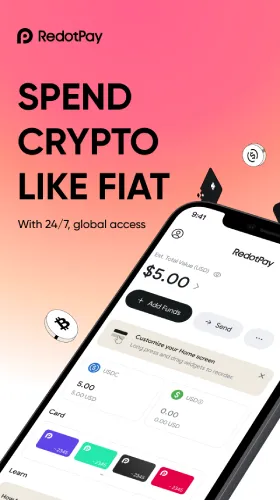
RedotPay Earn lets you allocate supported assets (often including stablecoins) to pursue variable rewards while keeping clear visibility on balances and withdrawal options. It’s designed for hands-off users: set a sensible allocation, keep a spend buffer, and review monthly.

What Is RedotPay Earn?
A flexible rewards feature where you place part of your wallet balance into an Earn allocation. Rewards are variable (not guaranteed) and may update over time. You can typically redeem back to your wallet and use funds for card spending, swaps, P2P, or global payouts.
Availability, asset lists, rates, and redemption rules vary by region/tier. Always confirm inside the app.
Why Use Earn
- Put idle funds to work: Don’t let unspent balances sit still.
- Flexible access: Redeem back to wallet when you need to spend.
- Transparent experience: See allocations, indicators, and history in one place.
- Works with your stack: Pair with Multi-Currency Wallet, Card, P2P, and Global Payout.
How It Works
- Verify your account (KYC/KYB) for feature access and higher limits.
- Fund your wallet (often USDT/USDC or supported assets).
- Open Earn and choose asset + allocation (start small).
- Review indicators/notes and confirm.
- Track rewards and redeem back to the wallet when you plan to spend.
Smart Setup: The 70/30 Rule of Thumb
- 70% Idle → Earn: Allocate the portion you won’t need in the next 1–2 weeks.
- 30% Spend Buffer → Wallet: Keep a buffer for card reloads, payouts, and bills so you don’t have to redeem at awkward moments.
Adjust the split before travel, large invoices, or promotions.
Best-Practice Tips
- Passkeys + Alerts: Turn on passkeys (phishing-resistant) and transaction alerts.
- Convert at the edge: Move value on low-fee networks; swap only when you must pay out.
- Batch moves: Fewer, larger allocations reduce network and operational overhead.
- Memo & tag: Note purpose (“Taxes Q2,” “Travel Fund”) for clean exports and reporting.
- Monthly review: Rebalance after big life/events—trips, invoices, market moves.
Playbooks
Everyday Saver
- Keep 10–14 days of expenses in Wallet → put the rest in Earn.
- Weekly sweep: excess wallet balance → Earn.
Freelancer/Agency
- When invoices pay in, hold 1–2 payroll cycles in Wallet and route the rest to Grow Your Crypto until payout day.
- Use memos (invoice #, project) for reconciliation.
Traveler
- Before a trip, redeem part of Grow Your Crypto into Wallet, swap at tight spreads, then reload your card.
- After the trip, move leftovers back to Grow Your Crypto.
Fees, Access & Timing
- Fees/Spreads: Shown before you confirm swaps or payouts (if any).
- Redemption: Redeem back to Wallet first, then spend or transfer.
- Timing: Most wallet actions are fast; corridor rules and compliance checks can add time.
- Limits: Allocation and redemption limits depend on your tier/profile.
Risks & Disclosures
- Variable rewards: Not guaranteed; indicators can change.
- Asset risk: Consider the stability/liquidity of the asset you allocate.
- Operational risk: Network congestion or reviews may slow redemptions.
Mitigate by starting small, diversifying, and keeping a Wallet buffer.
FAQs
Are rewards guaranteed?
No. Earn rewards are variable and can change over time.
Which assets are supported?
Varies by region/tier. Check the in-app asset list and notes.
Can I spend directly from Earn?
Redeem back to Wallet first, then reload your card, swap, P2P, or run a payout.
Does Earn lock my funds?
Earn is designed to be flexible, but redemption timing can vary. Check your in-app terms.
Will I pay FX every time?
Only when you swap. To reduce FX churn, convert at the edge—right before you spend.